
Coinbase Pro Advanced Trade Easy Steps for Crypto Beginners
Getting into the world of cryptocurrency can feel like learning a new language. You might hear lots of terms, like "Coinbase Pro," and feel a bit lost.

Many guides out there use big words that make things even more confusing. This guide is here to change that.
Our goal is to give you a simple, clear, and easy-to-follow introduction to advanced trading on Coinbase, especially for new crypto users. You see, the standalone "Coinbase Pro" platform actually retired in November 2023. Its powerful features for smarter trading moved directly into the main Coinbase app and website, now called "Advanced Trade" [1]. So, when people talk about advanced trading with Coinbase, they’re often thinking of these tools. This guide will walk you through these advanced features without any hard-to-understand words.
By the time you finish reading, you’ll know how to:
- Open your very own Coinbase account.
- Put money into your account so you can start trading.
- Use basic trading steps, like placing simple orders.
- Understand the small fees you might pay when you trade [2].
- Keep your crypto safe and sound, including how to avoid common mistakes with your login details. If you want to learn more about protecting your account, check out our guide on broker login mistakes every crypto beginner makes and how to fix them.
- Understand important actions, like how to handle a coinbase withdrawal.
We believe everyone should have clear, simple steps to manage their crypto. For even more step-by-step crypto education, safety tips, and clear guidance, consider subscribing to the free Clicks and Trades newsletter. It’s a great way to keep learning!
Ready to make sense of advanced crypto trading?
Sign up for our free newsletter today and get more simple crypto tips delivered to your inbox.
What Coinbase Pro is (and why beginners should care)
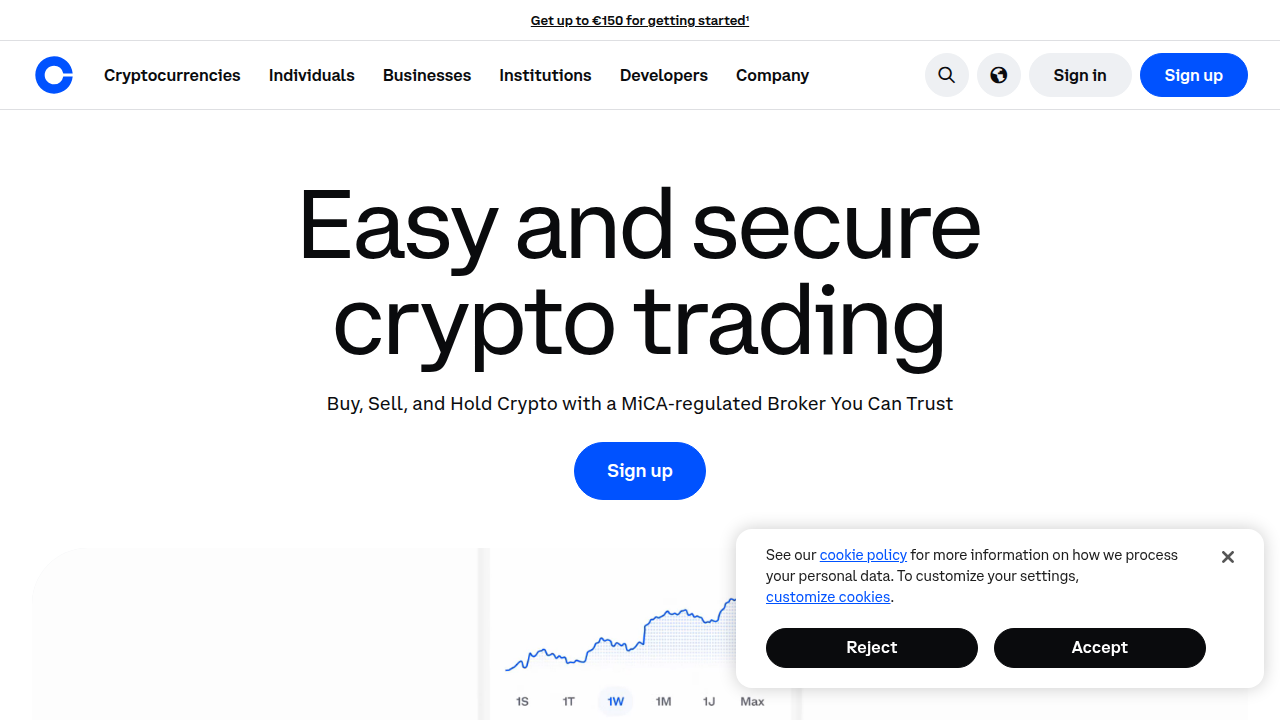
When people talk about "Coinbase Pro," they’re usually thinking about a special place to trade crypto with more tools. Think of it like a souped-up version of the regular Coinbase buying and selling. It used to be a separate app and website. But guess what? In November 2023, Coinbase Pro actually went away [1]. Its cool, advanced trading features didn’t disappear, though. They just moved right into the main Coinbase app and website. Now, these tools are called "Advanced Trade" [2].
So, when we talk about Coinbase Pro, we’re really talking about these "Advanced Trade" features that are part of your regular Coinbase account today in 2026.
Why Beginners Should Look at Advanced Trade
Even if you’re just starting, understanding Advanced Trade is super helpful. It gives you more ways to buy and sell crypto than the simple "buy now" button. It’s built for people who want more control over their trades. Many beginners start with the easy buy/sell option, which is great. But as you learn, you might want to try these more advanced ways.
Here are some key things you can do with Advanced Trade:
- Different Ways to Buy and Sell (Order Types): Instead of just buying crypto right away at whatever the price is (called a market order), you can tell Coinbase to buy or sell only when the price hits a certain level you choose. This is called a "limit order" [3]. It means you can plan your trades better and try to get a price you like.
- Trade Many Different Crypto Pairs: On the regular Coinbase, you might mostly buy crypto with US dollars. With Advanced Trade, you can trade one type of crypto for another. For example, you could trade your Bitcoin for Ethereum. This gives you many more options for managing your crypto assets. It’s like having more choices at the store! If you’re curious about different trading platforms, you might find our guide on choosing the best trading platforms in 2026 useful.
- Lower Fees: Here’s a big reason why people use Advanced Trade. The fees can be lower than with the simple buy/sell option [4]. This is because the fees are usually based on how much you trade. The more you trade, the lower your fees can get. Regular Coinbase might charge higher fees for simple buys [5]. Keep in mind that every time you move money or crypto, like a coinbase withdrawal, there might also be small fees involved.
Coinbase itself is a very popular place for crypto, holding lots of customer money and offering many different cryptocurrencies [6]. Using Advanced Trade through your Coinbase account helps you grow your skills and potentially save on trading costs. It’s a stepping stone to becoming a smarter crypto trader.
If you’re eager to learn more simple, clear steps for navigating crypto, consider joining the free Clicks and Trades newsletter. It’s packed with easy-to-understand tips.
Sign up for our free newsletter today and get more simple crypto tips delivered to your inbox.
Opening a Coinbase account: step-by-step (verification & identity)
Ready to start your crypto journey and maybe even try out the Advanced Trade features (what used to be called Coinbase Pro)? The very first step is to open a Coinbase account.
It’s a bit like opening a bank account, with steps to make sure everything is safe and secure. Coinbase is a major player in crypto, and they work to keep things reliable for users [3]. Let’s walk through it together.
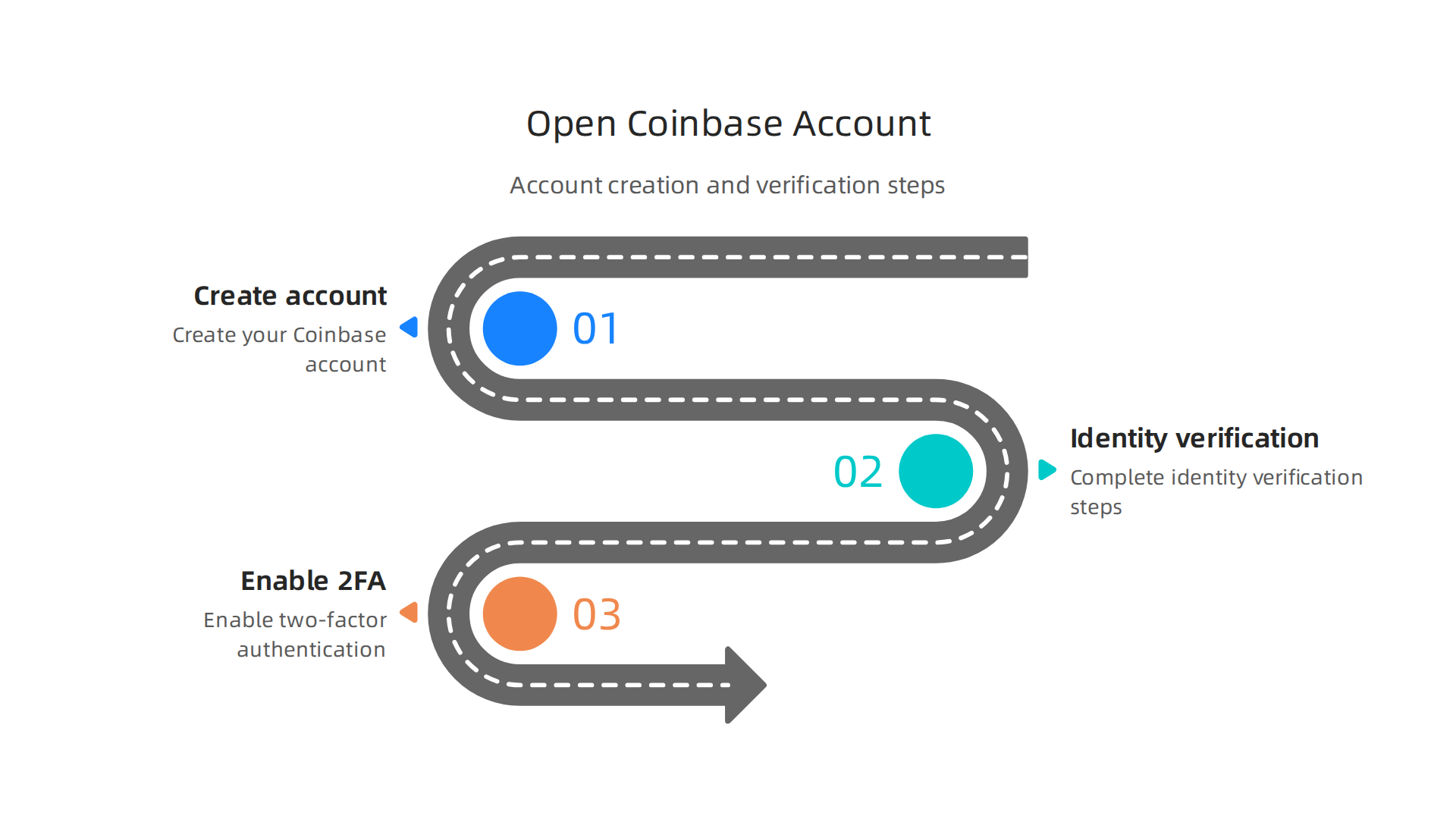
Step 1: Create Your Account
First, you’ll go to the Coinbase website or download their app. You’ll need to provide some basic information:
- Your email address: Pick one you use often and check regularly.
- A strong password: Make it a secret only you know. Mix big letters, small letters, numbers, and symbols.
- Your country and state: This helps Coinbase follow local rules.
After you put in this info, Coinbase will send an email to confirm it’s really you. Click the link in that email to move forward.
Step 2: Verify Your Identity
This is a super important part! Coinbase needs to know who you are. This isn’t just to be nosey; it’s a rule called "Know Your Customer" (KYC) that helps stop bad stuff like money laundering [2]. It also helps keep your funds safe and allows for things like easy payment processing and account verification [1].
Here’s what you’ll typically need:
- A government-issued ID: This could be a driver’s license, passport, or state ID. Make sure it’s not expired!
- Proof of address: Sometimes, they’ll ask for something like a utility bill or bank statement that shows your current address.
You’ll usually take photos of these documents with your phone or computer camera and upload them to Coinbase. Sometimes, they might also ask you to take a quick selfie to match your face to your ID.
Tips for smooth verification:
- Clear photos: Make sure your documents are in good light and all text is easy to read. Blurry pictures might make you wait longer.
- Matching info: The name and address on your ID must exactly match what you put into your Coinbase account. Small differences can cause problems.
- Be patient: It can sometimes take a little while for Coinbase to review your documents. If you have trouble, you can always reach out to Coinbase customer service for help.
Step 3: Enable Two-Factor Authentication (2FA)
This is a must-do for keeping your Coinbase account super secure. Two-factor authentication adds an extra lock to your account. Even if someone guesses your password, they can’t get in without a special code.
Here’s how it usually works:
- You’ll link your account to an authenticator app (like Google Authenticator) or your phone number.
- Whenever you log in or make a big change (like a Coinbase withdrawal), Coinbase will send a temporary code to that app or your phone. You’ll need to enter this code to prove it’s you.
This extra step might seem like a small hassle, but it’s a huge shield against unauthorized access. We talk more about avoiding login mistakes and keeping your crypto safe in our guide on broker login mistakes every crypto beginner makes and how to fix them.
Once you complete these steps, your Coinbase account will be ready to go! You can then link a bank account or debit card to start buying crypto, and you’ll have access to all the features, including the Advanced Trade options (the old Coinbase Pro features) for more savvy trading.
Want more simple, clear steps for navigating crypto? Our free Clicks and Trades newsletter delivers easy-to-understand tips right to your inbox.
Sign up for our free newsletter today and get more simple crypto tips delivered to your inbox.
After you’ve set up your Coinbase account, the next big step is to put money into it. This is how you’ll get ready to buy cryptocurrencies like Bitcoin or Ethereum. It’s a bit like putting money into your bank account before you can spend it. Coinbase works to make it simple to add funds, so you can start using their trading platform, which includes the Advanced Trade features (what used to be called coinbase pro). Coinbase helps make payment processing easy and reliable for users [2, 3].
Different Ways to Add Money to Your Coinbase Account
There are a few main ways to put money into your coinbase account:
-
Bank Transfers: This is like sending money directly from your bank.
- ACH (Automated Clearing House) transfers are common in the United States. They usually have low or no fees, but it can take a few business days for the money to fully arrive and be ready to trade.
- SEPA (Single Euro Payments Area) transfers are used in Europe and work in a similar way.
- Wire Transfers are often faster, sometimes even on the same day, but they might have higher fees. These bank transfer methods generally let you move larger amounts of money.
-
Debit Cards: You can connect your debit card for fast deposits. The money usually appears in your account right away, which lets you buy crypto very quickly. But, debit card deposits might have higher fees and lower daily limits compared to bank transfers.
-
Credit Cards: Many places, including Coinbase, have stopped or limit using credit cards for crypto purchases. It’s generally not a good idea anyway, because credit card companies might treat it like a cash advance, which can mean extra fees and higher interest. Always check Coinbase’s current rules for your country.
-
Crypto Deposits: If you already own cryptocurrency in another digital wallet, like Bitcoin or Ethereum, you can send it straight to your
coinbase account. This is usually fast once the crypto network confirms the transfer. With this option, you don’t even need to use your regular money.
Checking Your Money and Avoiding Mistakes
Once you send money, you’ll want to check its status. Your Coinbase account has a section where you can see if your deposit is "pending" (meaning it’s on its way) or "completed" (meaning it has arrived). It’s very important to wait until your funds are fully "available" before you try to trade or buy crypto. Trying to buy with money that hasn’t fully cleared yet can cause delays or problems. If you’re ever not sure or if a deposit takes longer than you expect, please reach out to coinbase customer service for help. They can check your specific situation.
Always make sure all the details are correct when you send money. Double-check any bank account numbers or crypto addresses. Even a small mistake could send your money to the wrong place, and it might be very hard to get it back. Coinbase works as a platform for digital assets, and like any money platform, being careful helps keep things safe [1].
Confirm Before You Trade
Just because a deposit shows "pending" does not mean it’s ready for trading right away. Coinbase often holds funds from bank transfers for a few days to make sure everything is clear. This process helps keep your money safe. Once the funds are fully confirmed and "available," you can use them to buy, sell, or send crypto. This applies whether you’re using the simple Coinbase interface or the more advanced tools on what was once known as coinbase pro. Knowing when your funds are truly ready is a key part of choosing a good platform. If you’re looking for more advice on picking the right platform, our guide on choosing the best trading platforms in 2026 can help.
We’re here to help you understand all the simple steps in crypto. For more easy-to-understand tips and guides, our free Clicks and Trades newsletter can be a great help.
Sign up for our free newsletter today and get more simple crypto tips delivered to your inbox.
Okay, so you’ve added money to your Coinbase account. Great job! Now you’re ready to explore trading. While the basic Coinbase app is simple, many people want more tools. That’s where Coinbase Advanced Trade comes in. It used to be known as coinbase pro, and it gives you a lot more details to help you make smart trades [2]. Think of it like going from a simple car to one with more gauges and controls.
Understanding the Advanced Trade Screen
When you open Coinbase Advanced Trade, it might look a little busy at first. Don’t worry. We’ll break it down into the main parts you need to know.
- The Market List: On one side, you’ll see a list of different cryptocurrencies you can trade, like Bitcoin, Ethereum, and many others. This is where you pick which crypto pair you want to look at, for example, BTC-USD (Bitcoin against US Dollars) [1].
- The Chart: This is the big graph that shows you how the price of a crypto has changed over time. Green bars usually mean the price went up, and red bars mean it went down. Learning to read these charts helps you see trends and make better guesses about what might happen next.

Many trading platforms, including Coinbase Advanced Trade, use tools like TradingView to power their charts [9]. For more simple ways to keep track of your crypto, our guide on how to choose the right Bitcoin tracker in 2026 can help.
- The Order Book: This is like a public list of everyone who wants to buy and sell a certain crypto right now. You’ll see "buy orders" (bids) at certain prices and "sell orders" (asks) at other prices. It helps you see how much people are willing to pay or sell for [9].
- Trade History: This small section shows trades that just happened. It lets you see what prices people actually bought and sold at very recently.
Making a Trade: Placing Your Order
This is where you tell Coinbase what you want to buy or sell.
- Market Order: This is the simplest way to trade. You say you want to buy (or sell) a certain amount of crypto right now at whatever the best price is available. It’s fast, but you don’t pick the exact price [3].
- Limit Order: With a limit order, you tell Coinbase the exact price you want to buy or sell at. For example, "I want to buy 1 Bitcoin when its price drops to $50,000." Your order will wait until that price is met or better. This gives you more control over the price you pay or receive [3]. You can learn more about setting limit orders in this helpful 2026 video [5].
- Stop Order: Stop orders are a bit more advanced and are often used to protect your money. A stop order becomes a market or limit order once a certain "stop price" is reached. For example, you might set a "stop-loss" order to sell your crypto if its price drops to a certain level, to prevent losing too much money [3]. This type of order helps you manage risk better.
Understanding these different order types can help you trade smarter on Coinbase Advanced Trade [1]. If you want to dive deeper into trading strategies, our free Clicks and Trades newsletter gives easy-to-understand tips. It’s a great way to get more simple guidance.
For more easy-to-understand tips and guides, our free Clicks and Trades newsletter can be a great help. Sign up for our free newsletter today and get more simple crypto tips delivered to your inbox.
You’ve learned how to make trades on Coinbase Advanced Trade. Now, let’s talk about how much those trades cost and how to keep your money safe. Trading isn’t always free, and protecting your account is super important.
Fees on Coinbase Advanced Trade
When you trade crypto, you usually pay a small fee. On Coinbase Advanced Trade (which many folks still remember as coinbase pro), fees are often set up in a way called "maker" and "taker" fees [1].
- Maker Fees: You’re a "maker" when you place an order that isn’t instantly matched. For example, you set a limit order to buy Bitcoin at a lower price than it is right now. Your order waits on the "order book" for someone else to sell to you. You "make" the market, and these fees are usually lower.
- Taker Fees: You’re a "taker" when you place an order that gets filled right away. This often happens with a market order, where you buy or sell at the best available price. You "take" an existing order off the order book, and these fees are sometimes a little higher [1].
In 2026, fees on Coinbase Advanced Trade can start around 0.40% for makers and 0.60% for takers at the lowest trading volumes. The more you trade, the lower these percentages can become [1]. This is different from the basic Coinbase app, where fees can include a spread and flat amounts, which some users find to be a big drawback [4, 3]. So, using Advanced Trade can actually save you money on fees.
You might also pay a small fee when you withdraw crypto from your Coinbase account. These "withdrawal fees" cover the cost of moving your crypto on its network. Always check the exact fees before you complete a trade or withdrawal to know your costs.
Keeping Your Coinbase Account Safe
Your crypto security is a big deal. Coinbase is generally seen as safe and legal in 2026, but you also have to do your part [5]. Here are some simple ways to protect your Coinbase account:
- Use Two-Factor Authentication (2FA): This is like having a second lock on your account. Even if someone gets your password, they still need a code from your phone to log in. It’s best to use an authenticator app, like Google Authenticator, instead of getting codes through text messages.
- Keep Your Devices Clean: Make sure your computer or phone is free of viruses or bad software. Use strong, unique passwords for everything, and never share your login information with anyone. If you make a mistake with your broker login, it can put your crypto at risk. You can learn more about how to avoid common mistakes with our guide on broker login mistakes every crypto beginner makes and how to fix them.
- Set Up a Withdrawal Whitelist: This is a smart security step. With a withdrawal whitelist, you tell Coinbase which crypto addresses are okay to send money to. If someone somehow got into your account, they couldn’t just send your crypto to their own address because it wouldn’t be on your approved list. This protects you even if they get a
coinbase withdrawal code textbecause the destination address isn’t approved.
These steps help you keep your money safe on Coinbase Advanced Trade. For more easy-to-understand tips and guidance on navigating the crypto world safely, our free Clicks and Trades newsletter can be a great help.
Sign up for our free newsletter today and get more simple crypto tips delivered to your inbox.
Trading crypto can be exciting, but it’s easy to trip up when you’re just starting. Even on a platform like Coinbase Advanced Trade (which was known as coinbase pro for a long time), folks can make common mistakes. Knowing these pitfalls ahead of time can save you money and stress in 2026.
Here are some common mistakes and how to steer clear of them:
Not Understanding Order Types
One big mistake beginners make is not knowing the difference between a market order and a limit order [1]. Remember, a market order buys or sells right away at the current best price, often making you a "taker" and paying a slightly higher fee. A limit order lets you set a specific price you want to buy or sell at [2]. Your order waits until that price is met, and you become a "maker," often paying lower fees.
- How to avoid: Always use limit orders when you’re not in a hurry and want to control your price. This lets you decide exactly what you’re willing to pay or receive. You can learn more about these order types on Coinbase Advanced Trade to make smarter choices [3, 4].
Trading with Your Feelings
It’s easy to get caught up in the excitement when prices go up (called FOMO, or Fear Of Missing Out) or panic when prices fall (FUD, or Fear, Uncertainty, and Doubt). Making trades based on strong feelings is a common mistake that can lead to bad choices and losing money [5].
- How to avoid: Have a plan before you trade. Decide when you’ll buy and when you’ll sell, and try to stick to that plan no matter what the market is doing. Don’t let quick price swings make you change your mind too fast [6].
Ignoring Small Costs and Fees
While we talked about fees, it’s worth saying again: forgetting to check all the costs can add up. This includes trading fees and network fees when you move crypto out of your coinbase account. Even a small coinbase withdrawal fee can surprise you if you’re not ready.
- How to avoid: Before you confirm any trade or withdrawal, always look at the final cost breakdown. Coinbase Advanced Trade shows you these details clearly. If you are ever unsure, contacting
coinbase customer servicecan help clarify things.
Not Starting Small
Many beginners jump in with too much money, hoping to get rich quick. This can be very risky, especially in the fast-moving crypto world.
- How to avoid: Start with a small amount of money that you’re okay with losing. This helps you learn without big risks. As you get more comfortable, you can think about investing more. Thinking about how to track your progress simply? Our guide on how to choose the right Bitcoin tracker in 2026 can help you keep an eye on your assets without getting overwhelmed.
Simple Risk-Management Moves
To stay safe and make smart choices, here are some easy rules to live by:
- Only invest what you can afford to lose: This is the golden rule of investing.
- Use stop-loss orders: These orders automatically sell your crypto if it drops to a certain price, helping you limit how much you might lose [7].
- Don’t put all your eggs in one basket: Try not to invest everything in just one type of crypto.
- Keep learning: The crypto world changes fast. Stay updated on market trends and new tools. For clear, step-by-step guidance and safety tips, the free Clicks and Trades newsletter can be a great resource.
By avoiding these common mistakes, you can trade more confidently on Coinbase Advanced Trade and protect your hard-earned money.
Ready for more easy crypto tips and straightforward advice?
Sign up for our free newsletter today and get more simple crypto tips delivered to your inbox.
Alternatives to Coinbase Pro and when to consider them
While Coinbase Advanced Trade, which was known for a long time as coinbase pro, is a solid choice, it’s smart to know that other options exist. No single platform is perfect for everyone. Thinking about other exchanges can help you find one that fits your needs even better in 2026.
Here are the main things to think about when comparing different crypto exchanges:
- Fees: How much does it cost to buy, sell, or move crypto? This is a big one. For example, Coinbase can sometimes have higher fees for simple trades compared to other platforms [1]. Some exchanges, like Binance or Kraken Pro, are known for offering lower trading fees, especially if you trade a lot

[2, 3]. Make sure to check both trading fees (maker/taker fees) and coinbase withdrawal fees, as these can add up.
- Liquidity: This means how easily you can buy or sell your crypto without changing its price too much. High liquidity is good because it means there are many buyers and sellers, so your orders get filled fast and at fair prices [4].
- Where It Works: Not all crypto exchanges are allowed in every country or even every state. Always check if a platform is available where you live. Regional availability can sometimes limit what you can do on an exchange [5].
- How Easy It Is to Use: Some platforms are super simple, great for beginners. Others have many advanced tools that might feel confusing at first. Think about what level of experience you have. Many people find Coinbase easy to use [6].
When Coinbase Advanced Trade is a Good Fit
Coinbase Advanced Trade is still a very strong choice for many people. It’s known for being safe and easy to get started with [7]. If you already have a coinbase account, it’s simple to switch to Advanced Trade for lower fees than the regular Coinbase app. It’s also a trusted name in the crypto world, which makes many beginners feel more comfortable [8]. If you need help, their coinbase customer service is there to guide you. For users who want a balance of easy-to-use features and powerful trading tools without too much complexity, Coinbase Advanced Trade is a solid option. You can learn more about choosing the right platform by checking out our guide on choosing the best trading platforms in 2026: a beginner’s checklist.
When Another Platform Might Be Better
Sometimes, another exchange might make more sense:
- If Fees are Your Top Priority: As we noted, some platforms like Binance or KuCoin often have lower trading fees, sometimes as low as 0.1% [9, 10]. If you trade often or with large amounts, these small differences can save you a lot.
- For Very Specific Coins: While Coinbase lists many popular cryptocurrencies, some smaller or newer coins might only be found on other exchanges.
- If You Need Different Features: More advanced traders might look for platforms with special charting tools or very unique order types that go beyond what Coinbase Advanced Trade offers.
- Regional Restrictions: If Coinbase isn’t available or has limited features in your area, you’ll need to look elsewhere.
When you’re dealing with any exchange, whether it’s your coinbase account or another, always make sure you understand the withdrawal process. Sometimes, you might need a coinbase withdrawal code text or similar security measure to keep your funds safe. Each platform will have its own security steps.
Understanding these points helps you make a smart choice for your crypto journey. And for more straightforward crypto education and safety tips, remember to check out the Clicks and Trades newsletter. It’s a great way to stay informed without getting overwhelmed.
Ready for more simple crypto tips and straightforward advice?
Sign up for our free newsletter today and get more simple crypto tips delivered to your inbox.
Summary
This article is a plain-language guide to advanced trading on Coinbase after the retirement of Coinbase Pro, now folded into the main app as Advanced Trade. It walks you step-by-step through opening and verifying a Coinbase account, funding it via bank transfers, cards, or crypto, and explains how to read the Advanced Trade screen including charts, the order book, and trade history. You’ll learn the main order types—market, limit and stop—how maker/taker fees work, and when Advanced Trade can save you money versus the basic app. The guide also covers core security steps like two-factor authentication and withdrawal whitelists, common beginner mistakes to avoid, and simple risk-management rules. Finally, it compares when Coinbase Advanced Trade fits your needs and when other exchanges might be better, so you can pick the right platform with more confidence.